Developers
GraphQL Developer API
Any workspace can expose a GraphQL API, generated from your schema automatically. Query and mutate your data, subscribe to changes, and build external integrations — all without writing a backend.
Turning the API on
The developer API is optional: each workspace decides whether to expose one. You switch it on under Developer API → Settings, which is also where the keys external clients authenticate with are managed.
Leaving it off takes nothing away from your apps — they read your data through Turbofy either way. The API is there for everything outside Turbofy: an integration, a script, another system of yours.
The GraphQL Playground
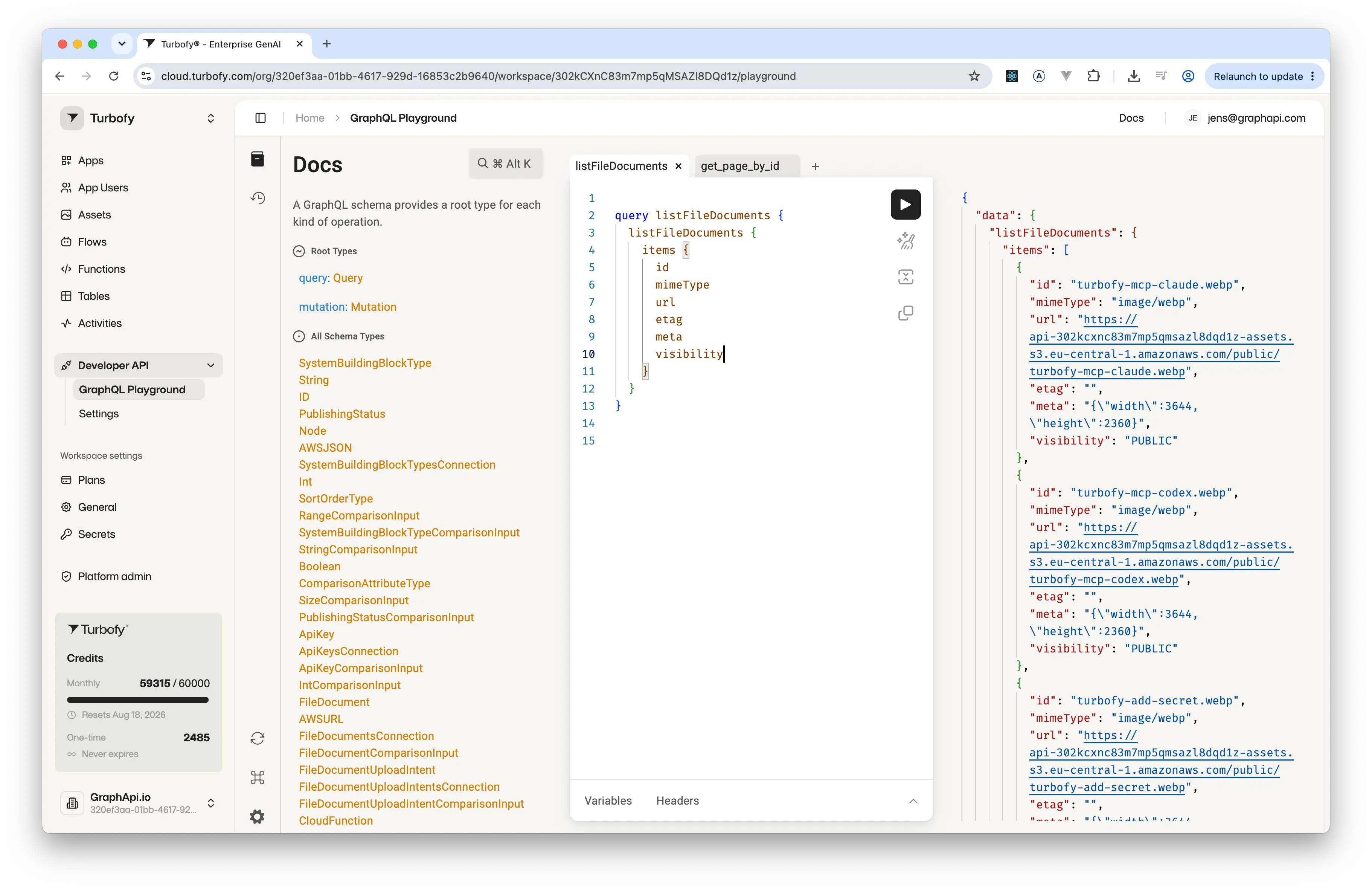
Developer API → GraphQL Playground gives you a full query workspace against your own schema. Write a query on the left, run it, and read the response beside it — with no client to set up first.
- The
Docspane browses the generated schema — the rootQueryandMutationtypes, and every type built from your tables. - Keep several queries open side by side as tabs, and pull up earlier ones from the history icon.
VariablesandHeadersalong the bottom let you parameterize a query and send the same key a real client would send.
Queries, mutations & subscriptions
Each table produces typed queries and mutations; subscriptions stream INSERT/UPDATE/DELETE events in real time.
query {
  listCocktails(first: 10) {
    items { id name price isAvailable }
  }
}

mutation {
  createCocktailOrder(input: { cocktailName: "Negroni", quantity: 2 }) {
    id status
  }
}
Visibility & access control
What the API exposes is decided per table, not per endpoint. A table's visibility settings say whether its records may be read or created publicly, and the queries and mutations generated for it follow that decision.
- A table with
Publicread answers queries without authentication. Without it, reads need a valid key and return only what that caller owns or shares. Public create,Public updateandPublic deleteeach open one kind of write to unauthenticated callers — a form needs the first and none of the others.Publishing settingsdecide what the table contributes at all:Allof its operations, only itsQueries, or only itsMutations.
See Tables Explorer for the full set of permissions and the combinations worth reaching for.
The API runs behind the same permission layer as the rest of Turbofy, with no way around it: a caller without access to a table does not get its records, however the query is written. Visibility is a property of your data — set once in the Tables Explorer, honoured by your apps, the MCP and this API alike.